Understanding RAG: A Comprehensive Intro and Shreya's Story

Welcome to the first blog of the series RAG—A powerful technique that enhances the accuracy and relevance of responses generated by large language models (LLMs) by incorporating information from external data sources relevant to user’s query.
Meet Shreya: A Gate Aspirant
To make this series more relatable and easy to understand, meet Shreya, a GATE aspirant. She has a PDF of previous years' GATE questions from the last 15 years, along with their answers. Now, she wants to know:
What was the most common control systems topic asked in last 5 years?
Manually going through such a long PDF isn't practical for her, so what's the solution? Should she copy and paste the entire document into ChatGPT? Of course not. The model has a limited context window and can't handle unlimited text at once. Even if she could somehow input all 500 pages, it would be very inefficient, and the model would return bloated or irrelevant answers. She only needs a focused answer, likely based on just 50 to 60 pages. Loading unnecessary data not only wastes computing resources but also reduces the quality of the output. This is where a RAG pipeline becomes essential.
How Retrieval-Augmented Generation (RAG) solves this
With a RAG-based setup, when Shreya wants to ask something from the PDF, she first needs to upload it to the system. The system then:
Chunks the whole PDF into small parts.
Embeds those chunks in 3D vector space.
Stores them in a vector database like Pinecone or Chroma.
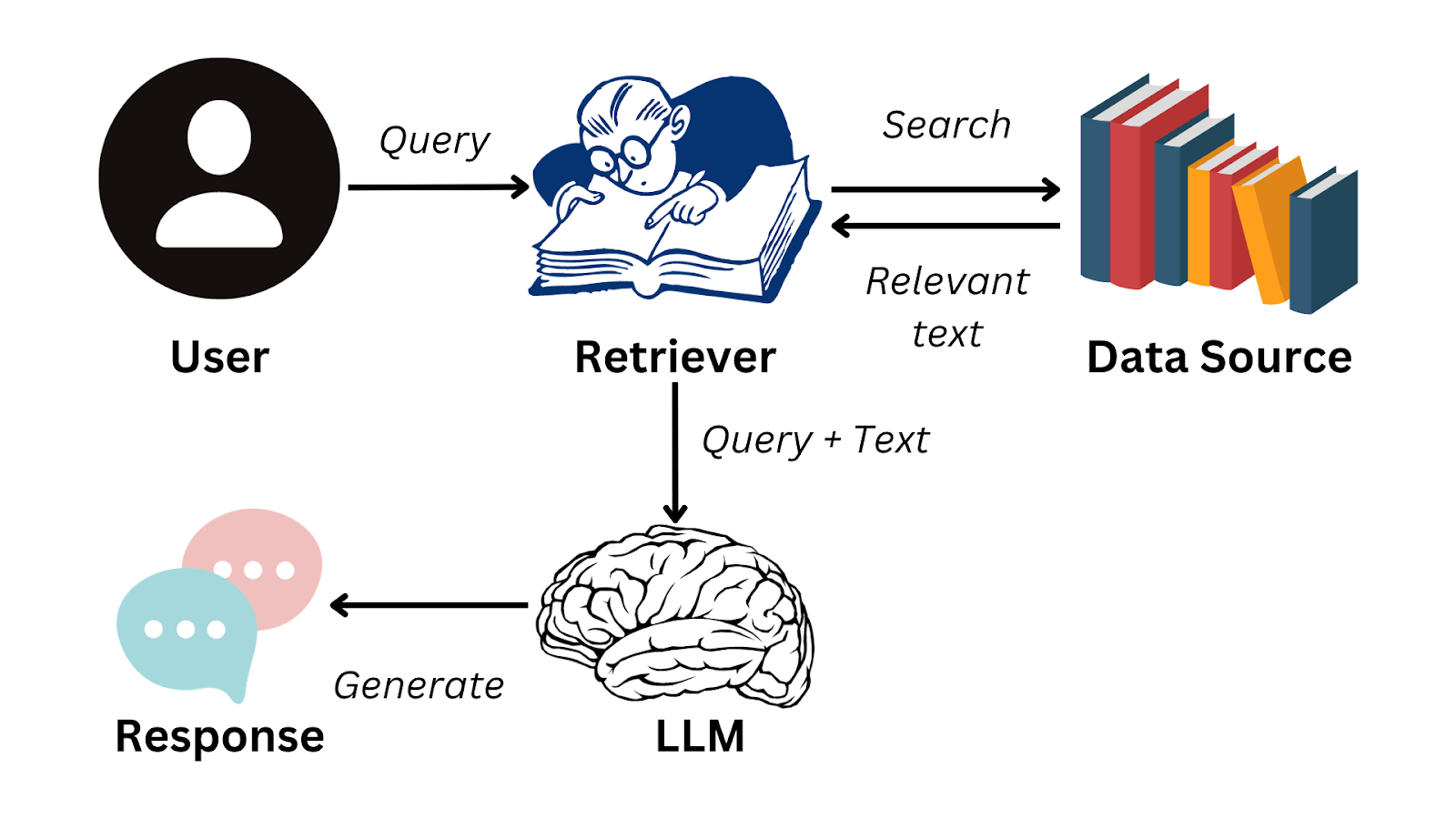
Now the system is ready to answer Shreya's questions. Let’s say she asks the same question again. The system will:
Input her query.
Performs a similarity search on the vector database to fetch only the relevant chunks.
Feeds those filtered chunks to the LLM.
Generates a sharp, focused response.
It’s the same as giving a cheat sheet to the model that’s been auto-curated for the specific question.
Now let’s understand all these steps one by one and try to code it:
GEMINI_API_KEY. Don't worry, it's free, so go ahead and get one. Also, you’ll need Docker installed on the system. So install that as well, if you haven't already. You can follow the Installation guide from here.Chunking
What is Chunking?
Chunking—Breaking something into small, manageable pieces, like eating a burger one bite at a time or splitting a long PDF into smaller sections in this case.
The logic for splitting can vary based on needs and circumstances. It can be done page by page, paragraph by paragraph, or even two paragraphs per chunk, or 1000 characters per chunk and so on. It completely depends on the developer.
Why is it needed?
Since the PDF Shreya had was very large, and if she wanted some precise answer, likely based on a few pages, dumping the whole PDF to LLM isn’t a great idea. As discussed above, it’ll lead to bloated or irrelevant answers. Also, it’ll waste computing resources.
What issue may come?
Context Loss is the main issue when chunking. In multi-page PDFs, there might be sentences that start on, let's say, page 1 and continue on page 2. In these cases, chunking by page would lose the sentence's context. Let's understand this better with the help of an image:

As you can see in the above image, chunk 1 doesn’t know about the other positions of `Hitesh Choudhary`, and chunk 2 doesn’t know what this content creator and CTO is.
To solve this, we’ll overlap some characters while chunking, i.e, include some characters from Chunk 1 in Chunk 2. As we can see in the next image, both chunks have enough context about their content.

How to do?
To do this, we’ll take the help of some built-in functions from langchain(If you don’t know, langchain has some built-in functions for developers to perform the common tasks in the world of LLMs.).
"""
DO INSTALL NECESSARY PACKAGES IN VIRTUAL ENVIRONMENT
- python -m venv venv
- source ./Scripts/venv/activate
- pip install langchain_community pypdf langchain_text_splitters
"""

from pathlib import Path
from langchain_community.document_loaders import PyPDFLoader
from langchain_text_splitters import RecursiveCharacterTextSplitter

pdf_path = Path("./gate-pyqs.pdf")    # Put the path of the PDF

loader = PyPDFLoader(file_path = pdf_path)    # PyPDFLoader is a utility function of langchain which helps to load the PDF
docs = loader.load()    # Loads the PDF

text_splitter = RecursiveCharacterTextSplitter(    # RecursiveCharacterTextSplitter is a utility function which helps to split the PDF in chunks based on characters
    chunk_size=1000,    # Split 1000 characters per chunk
    chunk_overlap=200    # Overlap 200 characters per chunk to avoid context loss
)

split_docs = text_splitter.split_documents(docs)    # Split the PDF / Chunking

print("Number of documents before splitting:", len(docs))
print(docs[0])  # docs is a list of Document objects
print("Number of documents after splitting:", len(split_docs))
print(split_docs[0])    # split_docs is a list of Document objects
Vector Embedding
What is Vector Embedding?
It maps the semantic meaning of words in a sentence to multi-dimensional coordinates (often visualized in 2D or 3D). For example, in the sentences, Monkey eats banana and Man eats rice, ‘monkey' and 'man' are both animals, while 'banana' and 'rice' are food items. As a result, 'monkey' and 'man' would be positioned close to each other in one region of the space, and 'banana' and 'rice' in another.

Why is it needed?
To better understand sentences, it's helpful to relate the words and vector embeddings do this effectively.
How to do?
We’ll again use a utility function from LangChain to create vector embeddings.
"""
- pip install langchain-google-genai
"""

import os
from langchain_google_genai import GoogleGenerativeAIEmbeddings

GOOGLE_API_KEY = os.getenv("GOOGLE_API_KEY")    # Get a Gemini API Key

embedder = GoogleGenerativeAIEmbeddings(    # GoogleGenerativeAIEmbeddings is an utility function to create vector embeddings
    model="models/text-embedding-004",    # Google's embedding model
    google_api_key=GOOGLE_API_KEY,
    )
Storing in Vector Database
What is a vector database?
A vector database is a specialized type of database designed to store, index, and query vector embeddings.
How to install/use a vector database?
There are various vector databases available in the market, for example, ChromaDB, PineCone, Qdrant, etc. Here we’ll go with QdrantDB, because it’s lightweight & open-source.
Make sure that you have Docker installed and it’s up and running. Run the following commands in the terminal.
docker pull qdrant/qdrant # Pull QdrantDB
docker run -p 6333:6333 -d qdrant/qdrant # Run the iamge in detach mode & Port Mapping
Now go to http://localhost:6333/dashboard You’ll have a pre-made Qdrant dashboard running here.
How to make vector embeddings?
"""
- pip install langchain_qdrant
"""

from langchain_qdrant import QdrantVectorStore    # langchain_qdrant is a utility package for interacting with QdrantDB

vector_store = QdrantVectorStore.from_documents(    # Creates a collection and store embeddings into the database
    documents = split_docs,
    url = "http://localhost:6333",
    collection_name = "learning_langchain",
    embedding = embedder
)

retriever = QdrantVectorStore.from_existing_collection(    # Creates a retriever to do query operations on db
    url = "http://localhost:6333",
    collection_name = "learning_langchain",
    embedding = embedder
)
Now the system is ready to answer Shreya's boring questions. I hope you haven’t forgotten that GATE aspirant.
Take Shreya’s query as input & perform a Similarity Search (Retrieval)
After storing the embeddings of her data source in a vector database, it's time to take her questions and find relevant content from the database. This content can then be provided to the LLM so the model can deliver precise and accurate answers.
user_query = input(">> ")

relevant_chunks  = retriever.similarity_search(    # similarity_search is a function to find similar embeddings
    query = user_query
)

print("Search result:", relevant_chunks)
Generate a response from LLM (Generation)
Now that we have the relevant data source and the user query, it's time to create a suitable SYSTEM_PROMPT and provide everything to the LLM. The LLM will handle the rest, and we'll receive the response we want.
"""
- pip install openai
"""

from openai import OpenAI

# Create client for chatting
client = OpenAI(
    api_key=GOOGLE_API_KEY,    # Provide Gemini API key here
    base_url="https://generativelanguage.googleapis.com/v1beta/openai/"
)

SYSTEM_PROMPT = """
You are a helpful assistant. You will be provided with a question and relevant context from a document. Your task is to provide a concise answer based on the context.
Context: {relevant_chunks}
"""

response = client.chat.completions.create(
    model="gemini-2.0-flash",
    messages=[
        {"role": "system", "content": SYSTEM_PROMPT.format(relevant_chunks=relevant_chunks)},
        {
            "role": "user",
            "content": user_query
        }
    ]
)

print(response.choices[0].message)
Now, if Shreya asks the same question, that is,
What was the most common control systems topic asked in last 5 years?
The similarity_search function will go to the database and find relevant chunks (control systems topic from last 5 years) from the data source and my LLM will now be able to answer that easily.
To summarize, here’s a flow of the whole process:

Click here to get the full code
Issues
Shreya was excited about the results she got while experimenting with her model. However, her excitement didn't last long because, during her testing, she asked another question:
Give me definitions, examples, plus tricky MCQs on LTI systems?
And in response, the model provided only definitions, which made Shreya return to the drawing board to adjust the architecture. In the next chapter, we'll see what Shreya did to improve her system.
This article introduces Retrieval-Augmented Generation (RAG), a technique that enhances the accuracy of large language models by incorporating external data. Using a real-life scenario of a GATE aspirant named Shreya, the article explains how RAG efficiently processes large documents by chunking and embedding them in a vector database. This approach retrieves relevant information to provide sharp, focused responses. The article also details the coding process for implementing RAG and highlights potential challenges in fine-tuning the system for comprehensive results.


